 GraceSheetKids
How to Create Bible Worksheets for Your Chosen Passage
Begin with the passage your class will read, then choose the activities that fit your teaching focus. In GraceSheetKids, the Bible Picker lets you select a book and a start and end reference before moving to the lesson settings. You do not need to start by finding the closest ready-made worksheet title.
This guide expands our passage-first Instagram walkthroughs. It explains the selection process; the screen examples are not proof of a newly generated worksheet or a physical classroom demonstration.
Decide what the page should help you discuss
Before opening the generator, finish one sentence: “After we read this passage, I want us to notice…” You might choose an event, a relationship, a repeated phrase or a question the text raises. Read enough surrounding context to understand it yourself.
A topic such as forgiveness can appear in many passages. An activity for one account is not automatically a good fit for another. The reference and the teaching focus should guide the page you choose.
Choose the reference in the Bible Picker
Select the Bible version and book. Use the chapter and verse number fields or their grid buttons to choose the start and end of the passage. Check the summary, then select Use this passage.
The current picker supports a range within one book covering up to three consecutive chapters. A longer range is a selection option, not a recommendation to give children every verse on one page. Divide your teaching across sessions if that better fits the group.
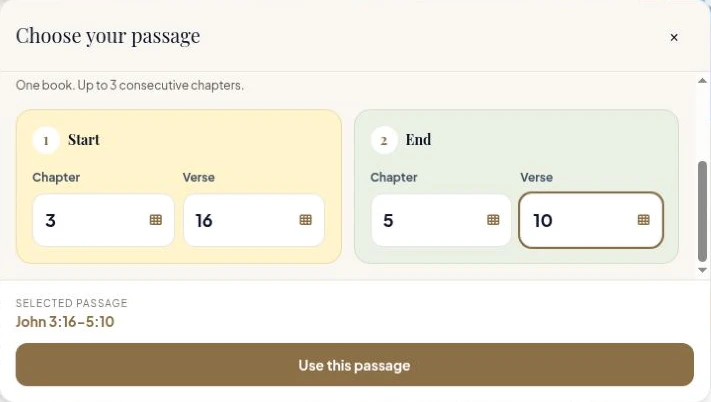
Actual production interface captured October 26, 2026. The visible John 3:16–5:10 range is an existing selection example from interface verification. No worksheet was generated for this article, and the image is not an AI recreation of the screen.
Choose the age group and the response you need
Use the available age-group controls as a starting point, then think about the children in front of you. An age label does not tell you everything about independent reading or writing. Decide whether the task needs an adult-read instruction, a drawing response or a text-based answer.
For different readers in one class, keep the shared passage while adapting the response. Our mixed-age lesson guide shows how to do that without turning the class into unrelated lessons.
Choose activities deliberately
You do not need to keep every suggested activity. Choose a small set that serves the discussion you want to have.
- Revisit wording: consider Scripture Memory and read the selected wording together.
- Recall an event sequence: consider Story Arrange, then verify the order against the passage.
- Invite an explanation: consider Imagine & Draw or a discussion activity and ask children what they noticed.
- Respond in prayer: consider Prayer Practice and review the wording for your group.
These are teacher planning examples, not a prescribed lesson plan or a guarantee that each activity is suitable for every passage and age combination. Check which activities are available for your chosen settings.

This actual control excerpt was captured October 22, 2026 for an earlier Micah 6:8 selection demonstration. It illustrates an activity choice; it is not an output generated for the passage in the Bible Picker image above.
Choose a sheet style, then generate and review
Choose a sheet style for the pages you are preparing. A style choice concerns presentation; it does not establish that every generated question is correct. Review the text, pictures and answers alongside your Bible, and check the print preview before making a class set.
Use the printing checklist for that final review. If repeated revisions are the part you find difficult, our worksheet prompting checklist helps you separate the decisions.
What can you inspect before generating?
The public printable library contains existing worksheet examples you can open and review. Those samples help you examine a task and its print layout; they do not preview the exact content a different passage will produce.
Start with the reference you actually intend to teach. Let the page support that lesson, rather than letting the worksheet you happened to find determine the passage.
Begin with the verses your class will read together.
Choose your lesson passage →